From Messy Notes to Clean SaaS Data: Building Automated Side Projects with Google’s LangExtract
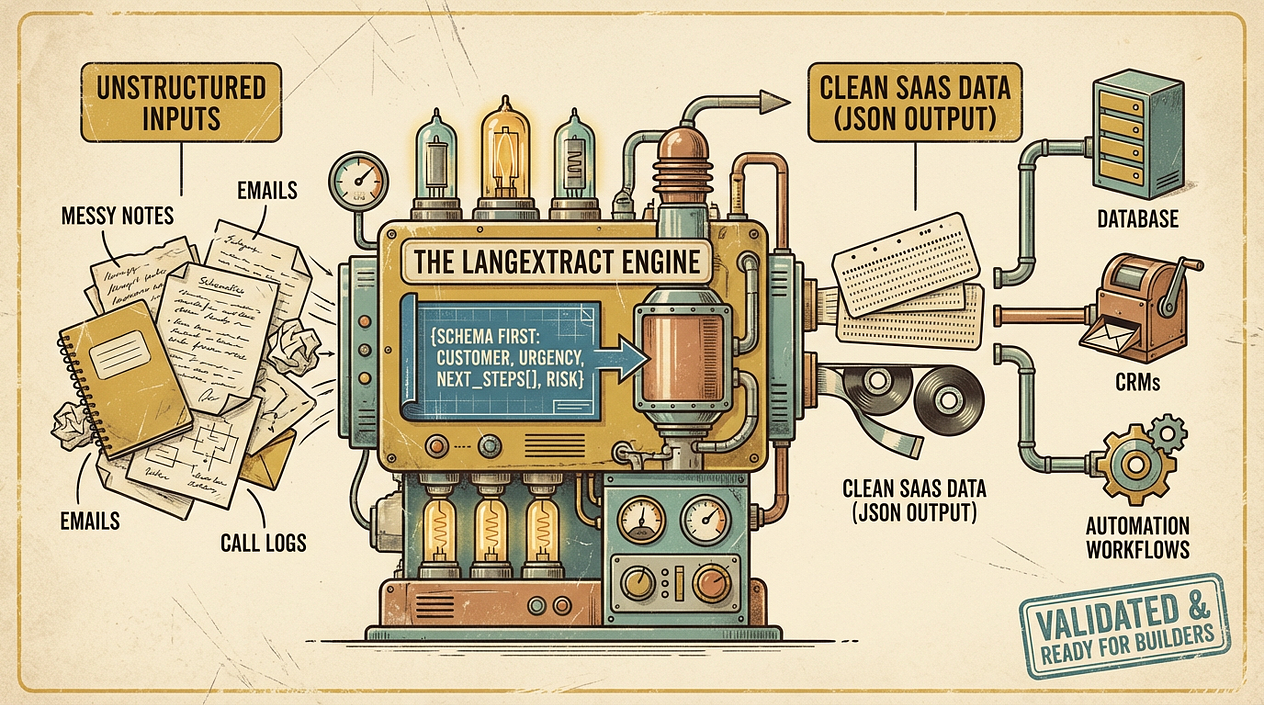
You finally carve out 45 minutes after work to “make progress” on your side project—then you spend it copy‑pasting messy notes into a spreadsheet, cleaning up support emails, or reformatting call summaries.
That manual cleanup is usually the first quiet bottleneck in a micro‑SaaS: you have information, but it’s trapped in unstructured text. If you can convert it into consistent fields (dates, names, topics, decisions, next steps), you can automate workflows, trigger reminders, populate a database, and start building real product features.
Google’s LangExtract points at a practical direction: use language models to extract structured data from messy inputs in a repeatable way. The win isn’t “AI magic”—it’s designing a pipeline that produces data your app can trust.
Why structured extraction matters (especially for side projects)
Side projects fail less from lack of ideas and more from lack of time. If your system requires constant human formatting, it won’t scale with a 9–5, family, and a life.
Structured extraction is the bridge between “text happens” and “software runs”:
- Text happens: meeting notes, emails, chat logs, form responses, invoices, feature requests.
- Software runs: databases, CRMs, ticket queues, reminders, analytics dashboards.
Once text becomes normalized records, you can build real automation: dedupe contacts, tag feature requests, create tasks, or update a customer timeline—without spending your evenings doing data entry.
LangExtract in plain language: schema-first text → JSON
At a high level, tools like LangExtract encourage a schema-first approach:
- You define the fields you need (your “contract”), e.g.,
{customer, pain_points[], urgency, requested_features[], next_action}. - An LLM reads the raw text and returns values for those fields.
- Your code validates and handles gaps (missing fields, low confidence, malformed JSON) before saving anything.
The important mindset shift is: don’t ask an LLM to “summarize” and hope it’s useful. Ask it to populate a specific structure your SaaS can depend on.
This fits the broader move toward more autonomous (“agentic”) developer tooling—where AI helps with multi-step tasks—but you still need strong boundaries and validation to avoid maintenance headaches later (a common warning in AI-assisted development tooling writeups, including n8n’s testing and comparisons) [https://blog.n8n.io/best-ai-for-coding/].
A practical extraction pipeline you can actually maintain
If you’re building nights and weekends, optimize for reliability and debuggability—not cleverness.
1) Start with a “minimum useful schema”
Pick 5–10 fields that unlock an automation. Example for meeting notes:
dateparticipants[]decisions[]action_items[](each withowner,due_date,task)risks[]
Keep it small. You can always add fields later; changing schemas too early creates churn.
2) Normalize the input before extraction
Do lightweight prep:
- Strip signatures/quoted threads from emails
- Convert audio transcripts to clean paragraphs
- Add simple separators like
---between sections
This reduces weird edge cases and improves consistency.
3) Extract → validate → retry (with guardrails)
A robust loop looks like:
- Call LangExtract to produce JSON
- Validate against your schema (types, required fields, allowed enums)
- If invalid, retry with a stricter prompt or a “fix invalid JSON” step
- If still invalid, route to a human review queue (even if that human is just you on Sunday)
This “trust but verify” pattern is what keeps AI-generated outputs from turning into silent data corruption.
4) Store both the raw text and the structured result
Always keep:
source_textextracted_jsonmodel/versiontimestamp
When something looks wrong two weeks later, you need to trace exactly what happened.
5) Automate the plumbing with simple workflows
If you’re integrating multiple services (Gmail/Slack/Notion → extraction → Airtable/Postgres), use a workflow tool where it helps. n8n’s commentary on hybrid approaches is useful here: AI can accelerate generation, but a stable visual workflow can reduce long-term maintenance burden [https://blog.n8n.io/best-ai-for-coding/].
Three weekend-sized use cases for side builders
-
Support inbox → product insights
- Input: support emails
- Output fields:
category,severity,feature_request,customer_segment,workaround,sentiment - Automation: auto-tag tickets, create feature backlog items, and send a weekly “top pain points” digest.
-
Sales calls → lightweight CRM updates
- Input: call notes/transcripts
- Output fields:
company,use_case,budget_range,timeline,next_step,objections[] - Automation: create follow-up tasks and keep a customer timeline without manual rewriting.
-
Receipts/invoices → bookkeeping-ready rows
- Input: forwarded receipts or PDF text
- Output fields:
vendor,date,total,currency,tax,category - Automation: push to a spreadsheet or accounting system; flag uncertain categories for review.
As AI coding assistants and “AI-first” workflows evolve, the real leverage for indie builders is turning messy real-world inputs into repeatable systems—not just generating more code (a trend noted across surveys of agentic coding tools) [https://www.shakudo.io/blog/best-ai-coding-assistants] and the broader “idea-to-income” tooling ecosystem [https://vibecoding.app/blog/top-10-vibe-coding-tools-indie-hackers-x].
Actionable takeaways
- Define a minimum useful schema (5–10 fields) before you extract anything.
- Build a pipeline that validates outputs and has a fallback when extraction fails.
- Store raw text + extracted JSON so you can debug and improve prompts over time.
- Use automation tooling where it reduces glue-code maintenance, but keep the core logic testable.
- Start with one workflow (support, CRM, or bookkeeping) that saves you time this week—then expand.
 Share on Reddit